Approval requests get lost when nobody can see whose turn it is. In KpiClock, I designed approvals so each company sets its own steps, every approver's status is visible at every step, and roster conflicts are caught while the roster is being built. KpiClock is live with 900+ companies and 25,000+ users.
Here are the four design decisions behind that, and what each one cost.
Why approvals go missing
KpiClock is an all-in-one team management product that replaced Hubstaff, BambooHR and DocuSign. Its HR side has approvals that involve several people: team leads and admins approve leave, and HR approves rosters. HR permissions arrived with the HR modules.
Every company approves leave and rosters differently. With several approvers, a request can sit in a queue with no one sure whose turn it is.
So the goal was simple to say: no request should disappear into a queue.
Steps each company configures itself
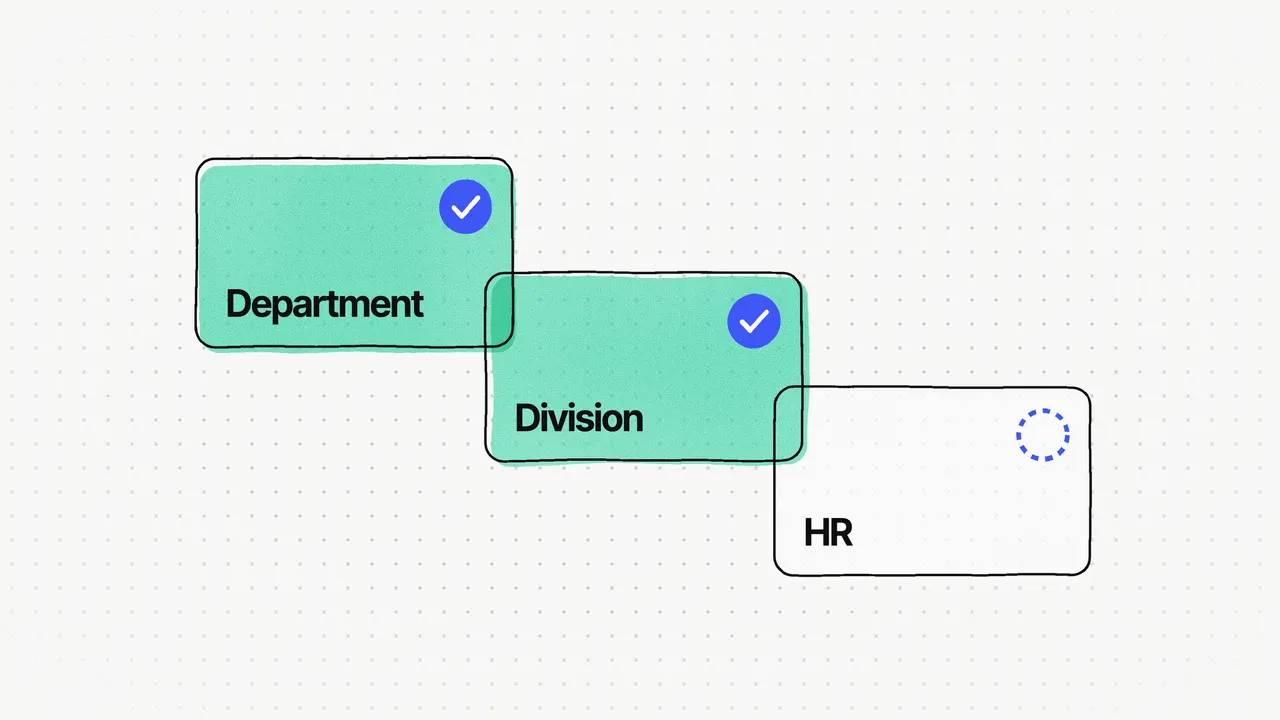
I designed a workflow builder in settings. Each company adds its own approval steps, for example department, then division, then HR. For each step, it sets the status for approval, rejection and pending.
One fixed approval path would fit almost no company. Making the steps configurable let the same product serve teams of every shape.
Who approves each step
The second decision was about the approvers themselves. At each step, a company chooses who acts:
- The employee's own unit, so the request goes to the person's own team or department.
- A higher level, such as a named role like Human Resource Manager.
- Another department and level, for approvals that sit outside the employee's own line.
- A named person, when one specific person signs off.
A flow can mix them, which is how a leave request moves from the employee's department, up to the division, and across to HR.
One fixed approval path would fit almost no company.
Status you can see at every step
The third decision: show the state of every request at every step. The roster approval screen has a timeline that shows each approver and where they are. Department and HR approved; admin pending. The timeline shows whose turn it is, so nothing waits silently.
The same idea runs into the records. An employee's roster shows every work slot with its approval status and lock status, and who created and approved it. Once a slot is approved, it's locked and can't change, so payroll and attendance stay in step. Audit logs record attendance edits, leave approvals and signing.
Everything time-related also sits in one calendar: shifts, holidays, leave, absences and each day's check-in status in one month view, so employees don't have to check three screens. Time tracking and the HR modules use the same components, so the approval screens look and work like the rest of KpiClock.
Conflicts caught when the roster is created
The last decision was about timing. If shift overlaps only show up after a roster is submitted, HR has to send it back and start again.
So the roster screen checks for conflicts while the roster is being built. When a new shift overlaps an existing one, it lists each employee affected and shows the existing shift and the changed shift side by side. A bad roster never reaches approval, so HR spends its time approving rosters instead of fixing them.
What it cost
Each decision had a price:
- Configurable steps mean more to set up before the first approval runs.
- Checking conflicts as you build means the roster screen has to check every change as it happens.
- I said no to single-step approvals, and no to catching conflicts after submission.
What I'd change is the foundation underneath. I'd design the calendar, the approval workflow and the roster as one shared scheduling foundation from day one. Shifts, leave, holidays and rosters all depend on the same time rules, and designing them as separate modules meant reconciling them later.