Work · Product Design

LiveDesign case studyHR and payroll web app and field force mobile appWeb appHR software

An HR platform redesigned around the tasks people actually get stuck on.

SmartPeople is SmartOffice's HR and payroll platform, built at BYSL Global Technology Group. I audited it against real HR and payroll tasks, then led its redesign before launch, on the web and on mobile.

Client
SmartOffice · BYSL Global Technology Group (Bangladesh)
My role on this product
Lead Product Designer
Team
Led a team of 6 · alongside 40+ engineers
Platform
Web app · field force mobile app · employee mobile app
Timeline
Audit Nov 2023 · launched Apr 2024
Status
Live · 100+ companies · 17,500+ employees
23critical points where people got stuck, found in the audit
+35%task completion after the redesign
+41%activation after the onboarding redesign
58% → 34%first-session drop-off
Challenge

Before launch, SmartPeople had to work for companies running real payroll. The audit found 23 critical points where people got stuck, mostly in the product's structure, payroll and settings.

What I did

Mapped the product into ten top-level modules, redesigned the screens around real tasks, designed the field force mobile app, and redesigned employee onboarding on mobile, tested in three rounds with 45 people.

Result

Launched in April 2024, now used by 100+ companies and 17,500+ employees. Task completion rose 35% and activation 41%.

Chapters

01 · Users and the audit

Four kinds of users, one product

HR admins
Employees, the organogram, official letters and notices.
Payroll and finance
Salary, tax, bonus, loans and advance salary.
Supervisors
Approvals and rosters.
Employees
Attendance, leave and payslips, on mobile.

I audited the product against real HR and payroll tasks and found 23 critical points where people got stuck. They sat in three areas: the product's structure, payroll management and settings.

02 · Structure

Ten modules, one map

I reorganised the product around ten top-level modules: Dashboard, Employee, Leave Management, Payroll Management, Notice Board, Challan and Requisition, Reports, Settings, Organogram and Official Letter. Settings were simplified so a company can set up once and move on.

SmartOffice · HR and payroll platformSmartPeople
  1. 01Dashboard
  2. 02Employee
  3. 03Leave Management
  4. 04Payroll Management
  5. 05Notice Board
  6. 06Challan & Requisition
  7. 07Reports
  8. 08Settings
  9. 09Organogram
  10. 10Official Letter
Module map · 10 top-level modules
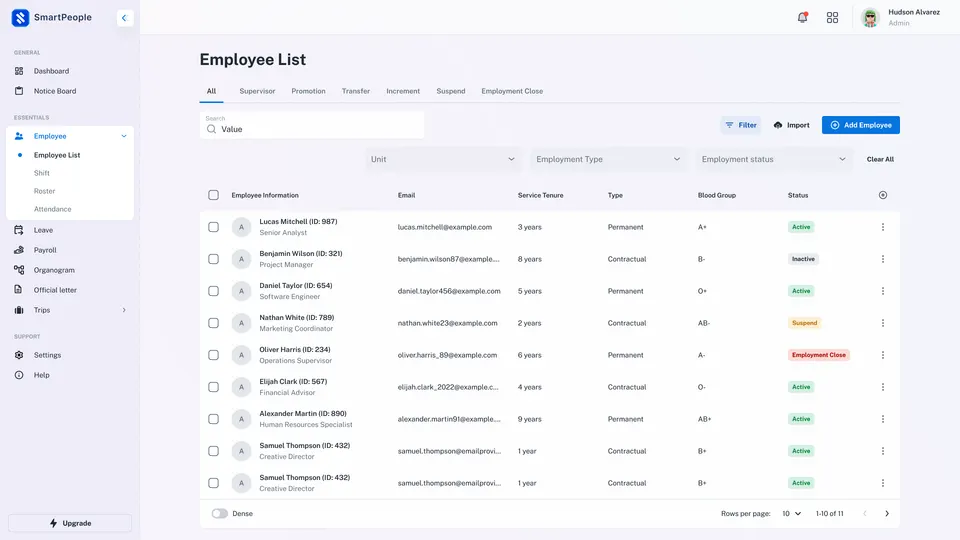
Employee: every person, with status and quick filters. Sample data.
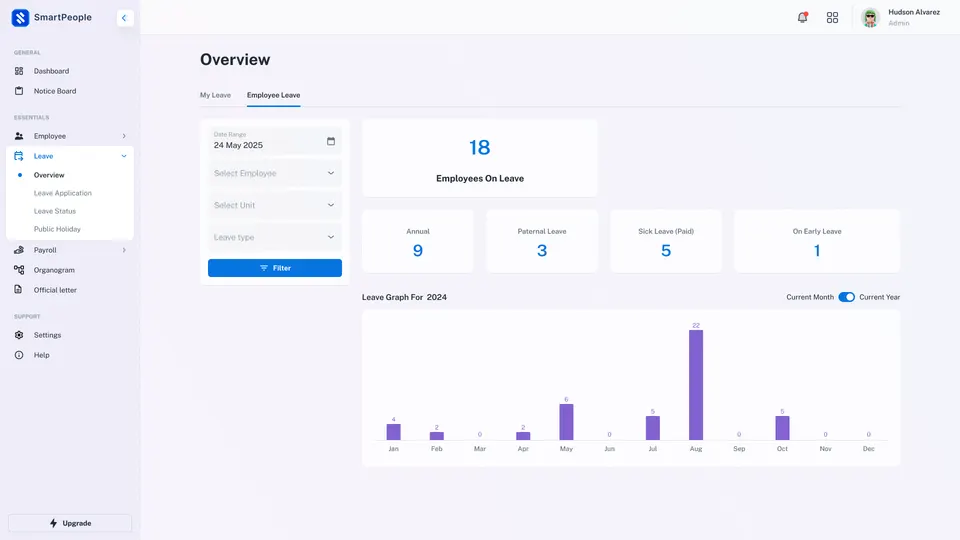
Leave: who is away today, by type and by month. Sample data.
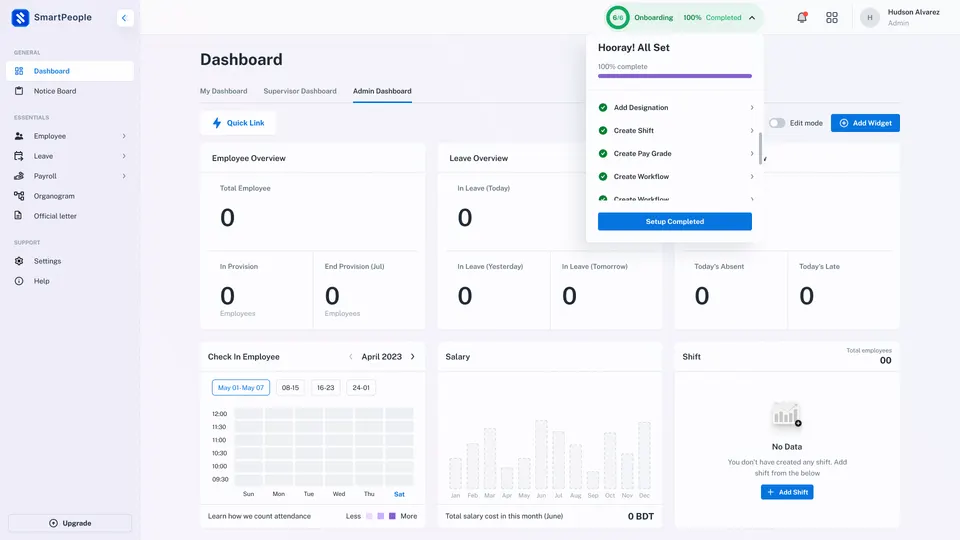
Company setup as one checklist on the dashboard: designations, shifts, pay grades and workflows.

03

Key screens

Decision 01

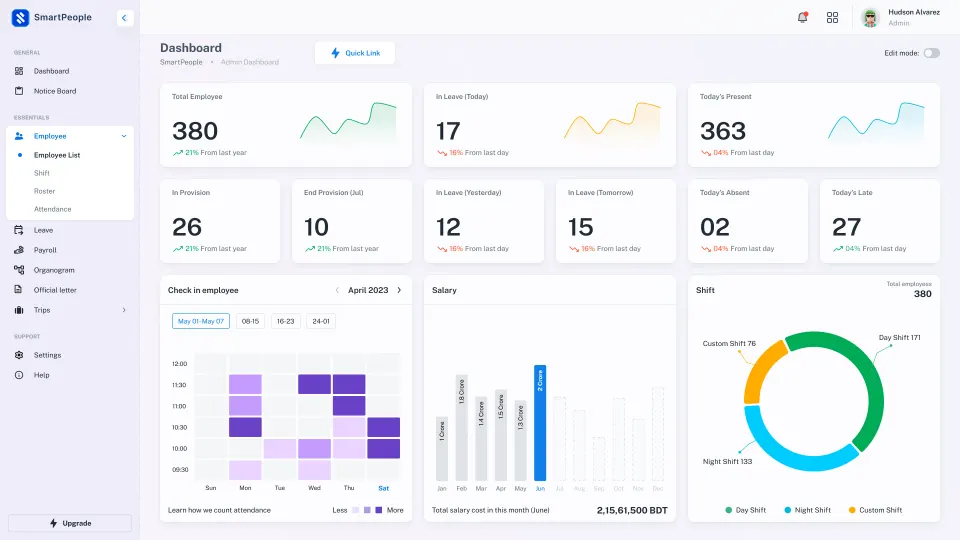
Dashboard first

The admin dashboard: the day's numbers, check-ins, salary and shifts. Sample data.
Problem
An HR admin needs to see the day at a glance.
Decision
One dashboard with the day's numbers, check-ins and approvals.
Decision 02

Approvals people can act on

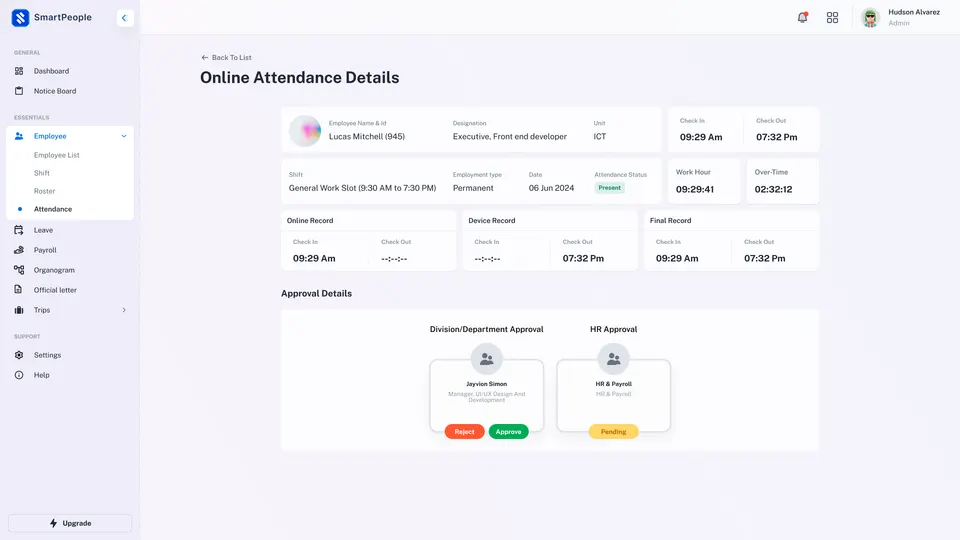
One attendance request: the records, the approval steps and the buttons on one page. Sample data.
Problem
Approvals were one of the places people got stuck.
Decision
Each request shows its details and the approval steps in one view, so a supervisor can approve without leaving the page.
Decision 03

Payroll built to international rules

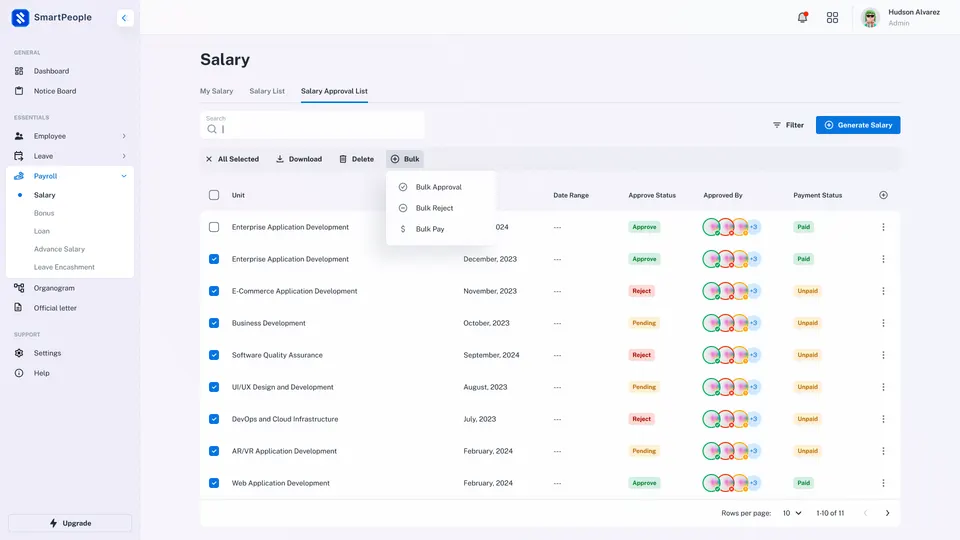
Salary approval by unit, with bulk approve, reject and pay. Sample data.
Problem
Payroll and tax are where an HR product can't be wrong.
Decision
Payroll rebuilt to international rules (pay grades, earnings, deductions, bonus, loans, advance salary and the financial year), with a new tax engine.
Decision 04

Field work in the same product

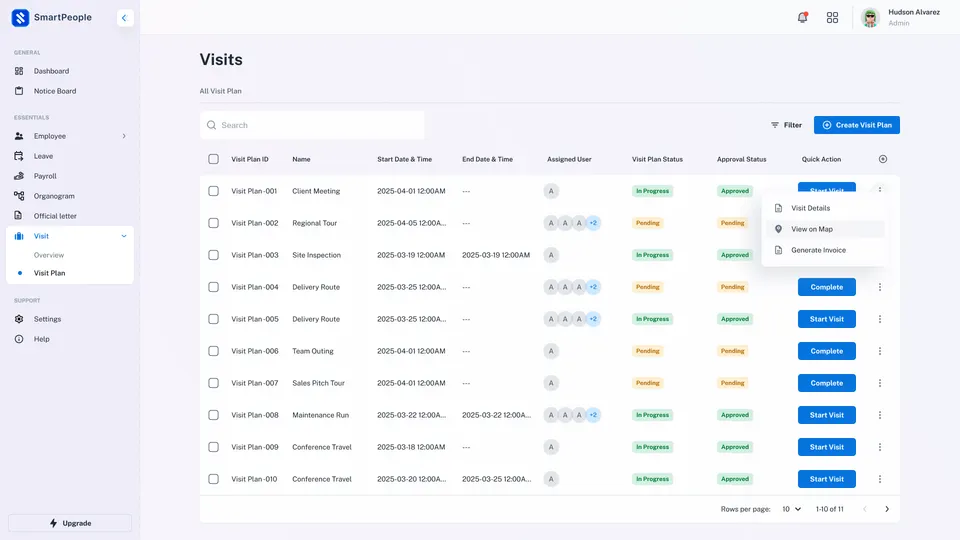
Visits on the web, with status, approval and the map one click away. Sample data.
View on Map: a day's planned and unplanned visits. Sample data.
Problem
Field staff work away from a desk, and managers still need to see their visits.
Decision
Visits with a map view on the web, and the same visits on the field staff's phone.

04

Field force on mobile

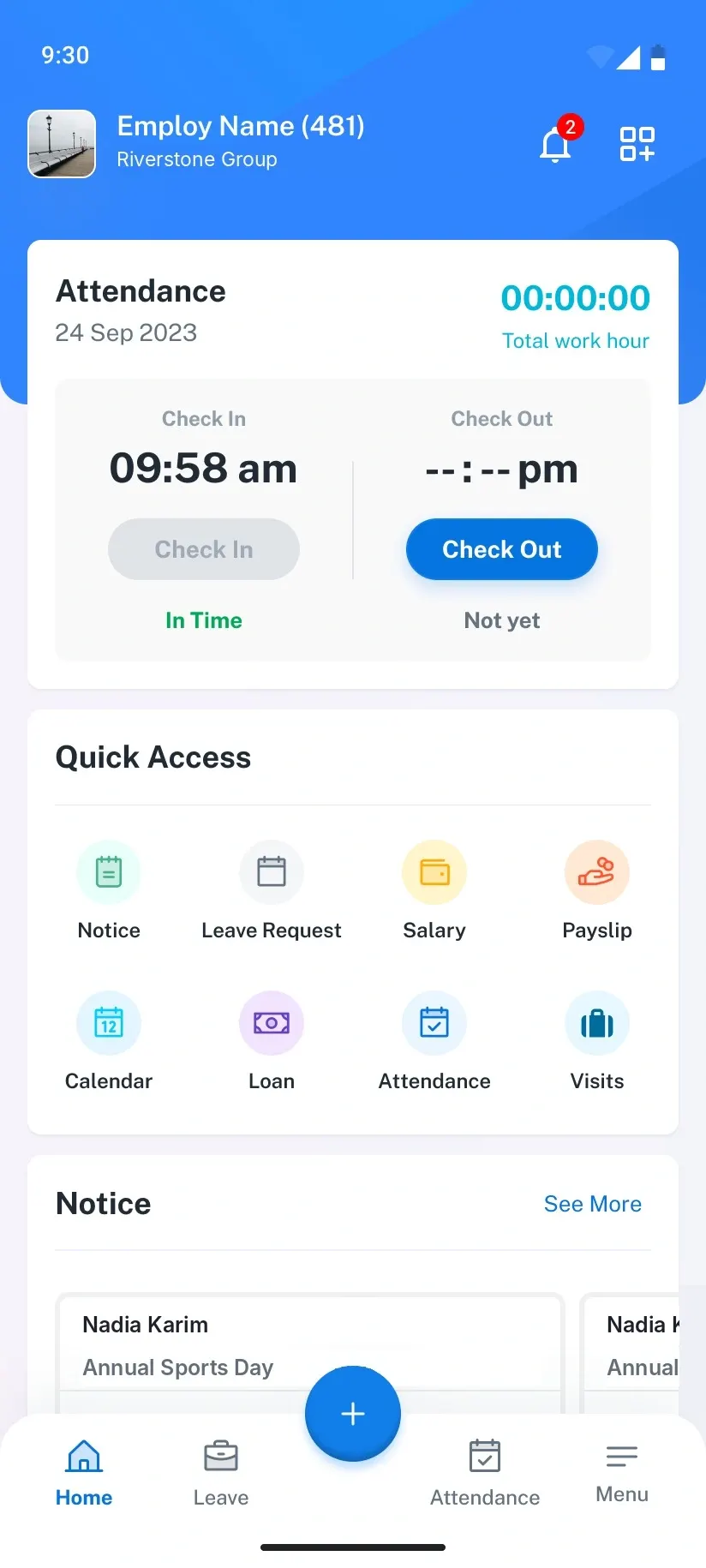
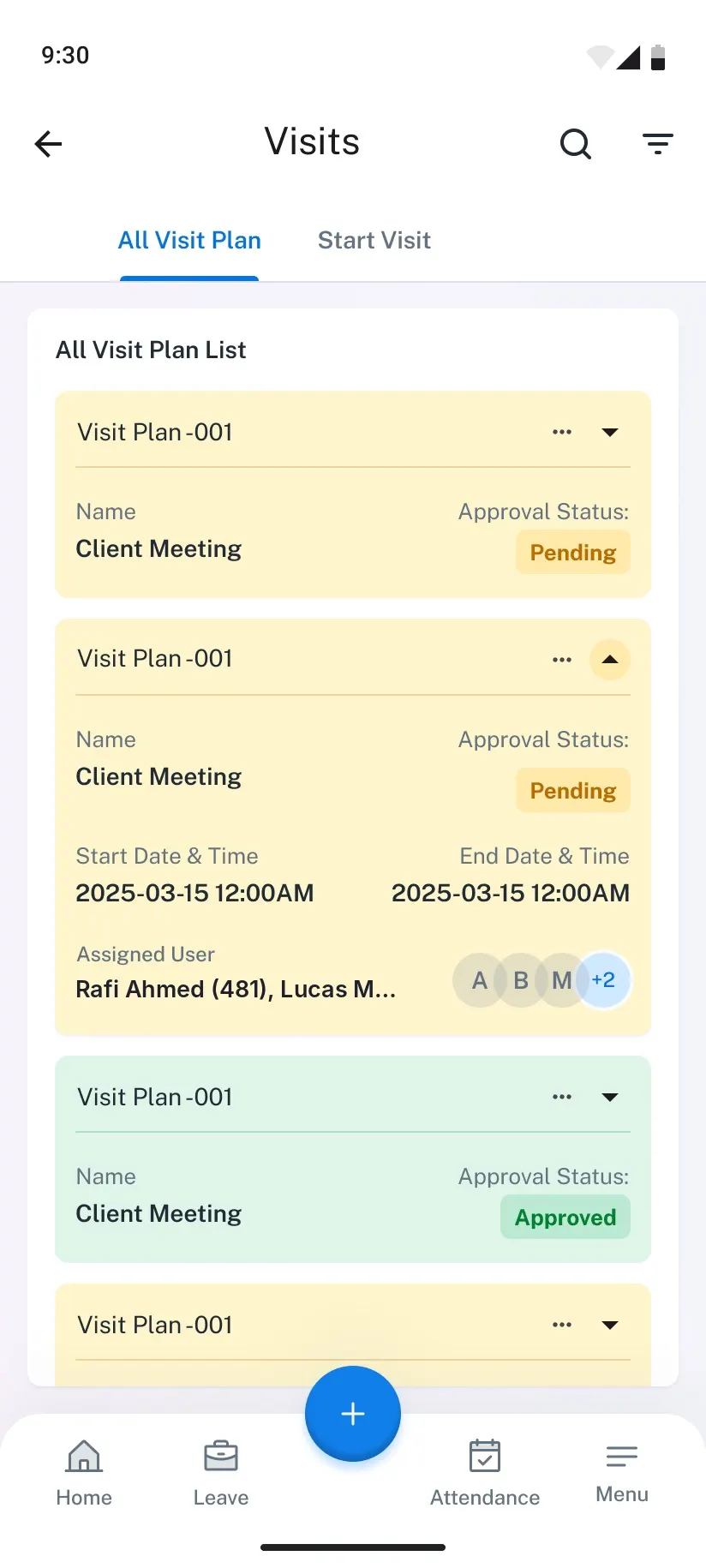
Field staff check in, see their day and log visits from the phone, and the manager sees the same visits on the web. The mobile app uses the same components and colours as the web app, so the two feel like one product.

The field force app: home with check-in, and the visit list. Sample data.

05 · Onboarding

Onboarding any user can finish

I redesigned employee onboarding on mobile so any user could finish it, tested in three rounds of guided usability sessions with 45 people. First-session drop-off fell from 58% to 34%, and activation rose 41%.

Before
58%
After
34%
First-session drop-off · before and after the onboarding redesign

06

Outcomes

100+

Companies

17,500+

Employees

+35%

Task completion after the redesign

+41%

Activation

58% → 34%

First-session drop-off

  • Launched April 2024, still live.

07

What I'd do differently

From the Journal

Related reading

Next design case study

ILLIYEEN

Read the case study
Building an AI product?QuestionsBook an intro call